> ## Documentation Index
> Fetch the complete documentation index at: https://sambanova-systems.mintlify.site/docs/llms.txt
> Use this file to discover all available pages before exploring further.
# Qwen Code CLI integration guide
Qwen Code CLI is an AI-powered coding assistant that supports multiple agent roles directly from your terminal. This guide walks you through connecting SambaNova's LLMs with Qwen Code CLI to streamline coding, debugging, and architectural tasks in your development workflow.
## Prerequisites
Before you begin, ensure you have:
* A [SambaCloud](https://cloud.sambanova.ai/apis) account with an API key
* Node.js 20 or later installed on your system
## Install Node.js
If you don't have Node.js installed, run:
```bash theme={null}
curl -qL https://www.npmjs.com/install.sh | sh
```
Verify the installation:
```bash theme={null}
node -v
npm -v
```
## Setup
### 1. Install Qwen code CLI
Install Qwen Code globally using npm:
```bash theme={null}
npm install -g @qwen-code/qwen-code
```
Verify the installation:
```bash theme={null}
qwen --version
```
Launch Qwen Code:
```bash theme={null}
qwen
```
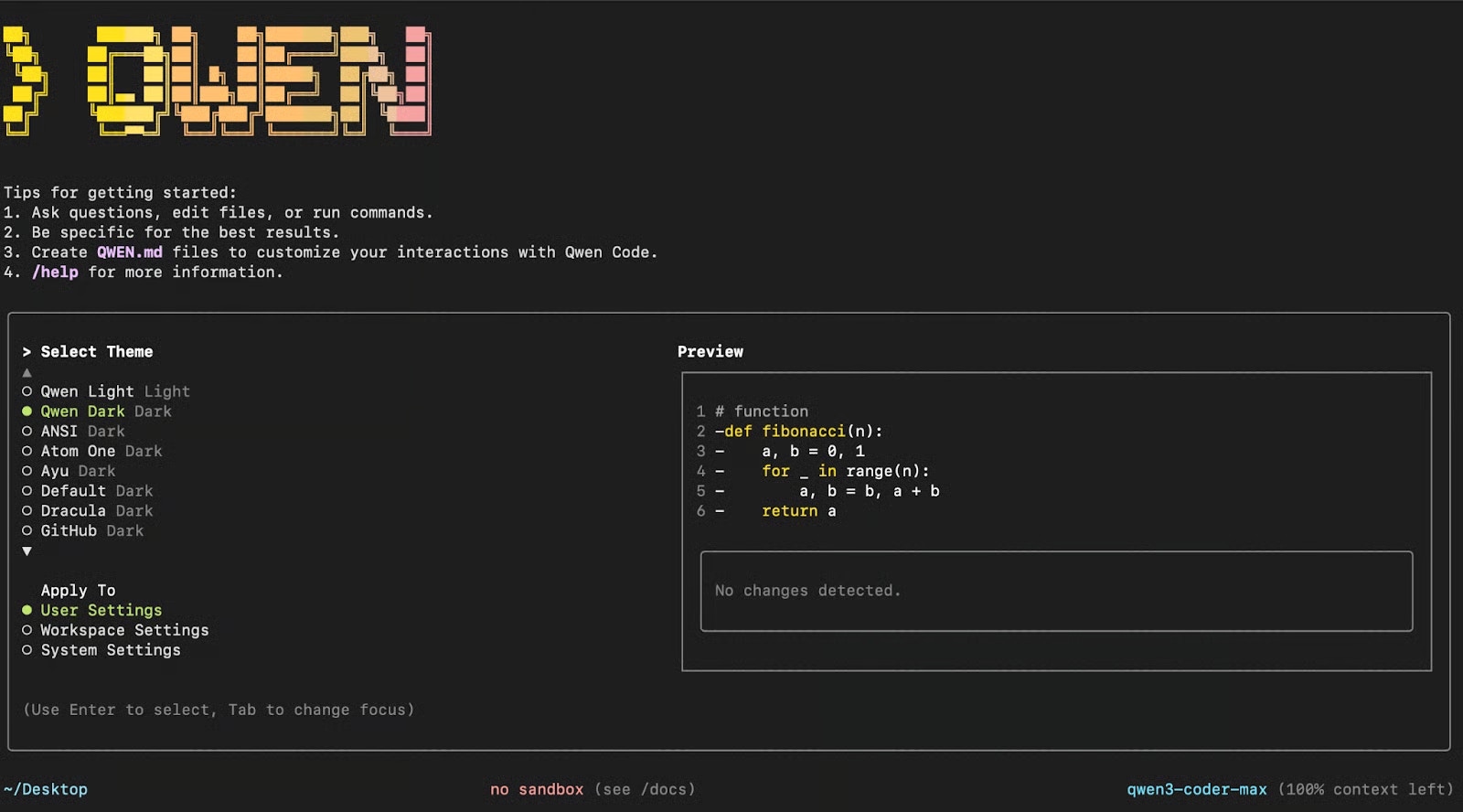 Press Enter to apply the default theme to your user settings. You'll then be prompted to configure authentication.
### 2. Configure SambaNova integration
**Option A: Interactive configuration**
When prompted, provide your SambaNova credentials:
```bash theme={null}
API_KEY > $SAMBANOVA_API_KEY
BASE_URL > https://api.sambanova.ai/v1
MODEL > DeepSeek-V3.1
```
**Option B: Environment variables**
Alternatively, set these values as environment variables:
```bash theme={null}
export OPENAI_API_KEY=$SAMBANOVA_API_KEY
export OPENAI_BASE_URL="https://api.sambanova.ai/v1"
export OPENAI_MODEL="DeepSeek-V3.1"
```
Once configured, press Enter in the Qwen Code CLI to start using it.
## Example workflow
In this section, you'll see how Qwen Code CLI can work with a real-world GitHub project. With just a few well-structured prompts, Qwen can help you navigate the codebase, optimize performance, extend functionality, and streamline documentation.
Through these examples, you'll learn how to:
* Analyze the overall architecture of the codebase
* Optimize functions for improved memory efficiency
* Extend functionality by integrating new components
* Push version-controlled updates directly to GitHub
* Document all updates in a clear, structured changelog
Let's walk through each of these steps in detail.
### 1. Explore and understand a codebase
Clone a sample repository and navigate to the project directory:
```bash theme={null}
git clone https://github.com/AashiDutt/Voxtral_with_vLLM.git
cd Voxtral_with_vLLM
```
Launch Qwen Code CLI:
```bash theme={null}
qwen
```
If you haven't configured your credentials yet, refer to the Setup section above, then analyze the project architecture:
```bash theme={null}
> Explain the architecture of this codebase.
```
Press Enter to apply the default theme to your user settings. You'll then be prompted to configure authentication.
### 2. Configure SambaNova integration
**Option A: Interactive configuration**
When prompted, provide your SambaNova credentials:
```bash theme={null}
API_KEY > $SAMBANOVA_API_KEY
BASE_URL > https://api.sambanova.ai/v1
MODEL > DeepSeek-V3.1
```
**Option B: Environment variables**
Alternatively, set these values as environment variables:
```bash theme={null}
export OPENAI_API_KEY=$SAMBANOVA_API_KEY
export OPENAI_BASE_URL="https://api.sambanova.ai/v1"
export OPENAI_MODEL="DeepSeek-V3.1"
```
Once configured, press Enter in the Qwen Code CLI to start using it.
## Example workflow
In this section, you'll see how Qwen Code CLI can work with a real-world GitHub project. With just a few well-structured prompts, Qwen can help you navigate the codebase, optimize performance, extend functionality, and streamline documentation.
Through these examples, you'll learn how to:
* Analyze the overall architecture of the codebase
* Optimize functions for improved memory efficiency
* Extend functionality by integrating new components
* Push version-controlled updates directly to GitHub
* Document all updates in a clear, structured changelog
Let's walk through each of these steps in detail.
### 1. Explore and understand a codebase
Clone a sample repository and navigate to the project directory:
```bash theme={null}
git clone https://github.com/AashiDutt/Voxtral_with_vLLM.git
cd Voxtral_with_vLLM
```
Launch Qwen Code CLI:
```bash theme={null}
qwen
```
If you haven't configured your credentials yet, refer to the Setup section above, then analyze the project architecture:
```bash theme={null}
> Explain the architecture of this codebase.
```
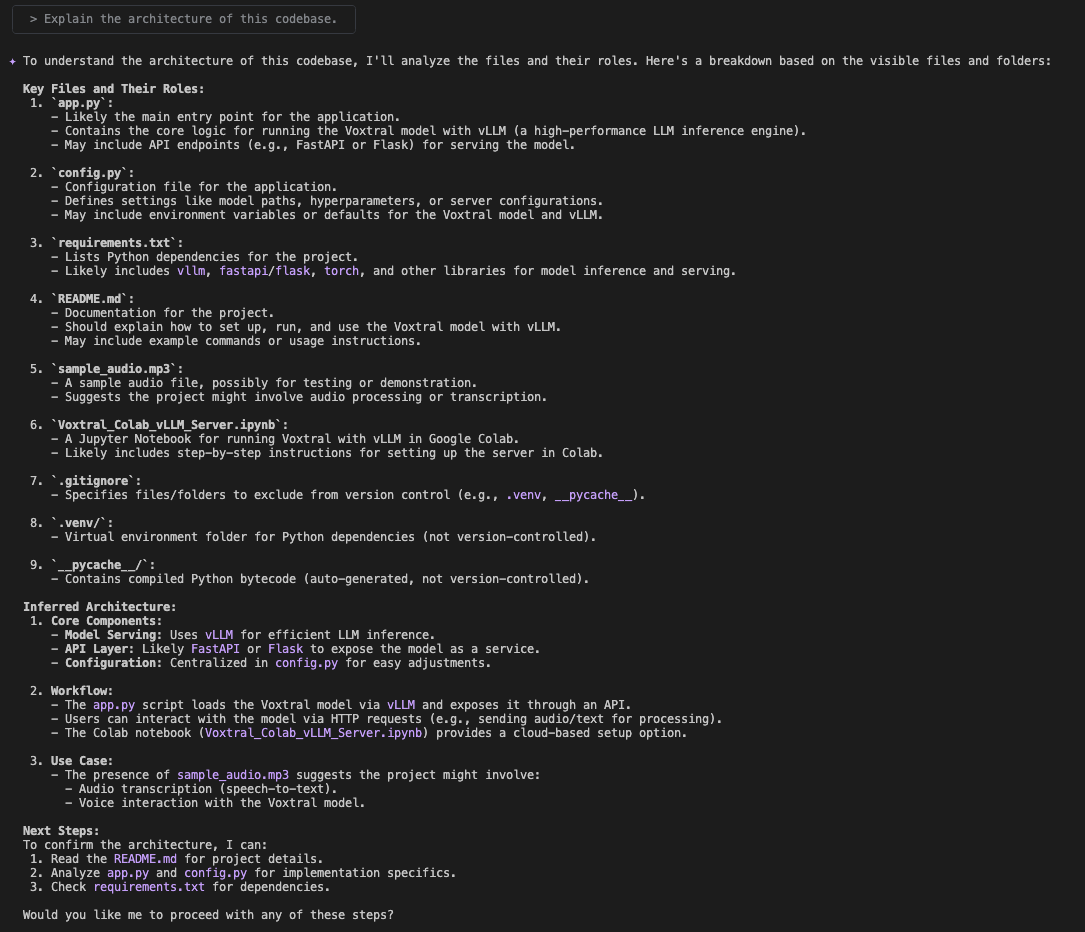 Qwen CLI automatically scans files such as `app.py`, `config.py`, `requirements.txt`, and generates a high-level architectural summary with suggested next steps.
### 2. Optimize and test code
After identifying several opportunities for improvement, focus on one of the most impactful changes: optimizing memory usage in the `transcribe_audio` function. To target that file, use the following prompt:
```bash theme={null}
> Optimize the code in transcribe_audio in @app.py
```
Qwen CLI automatically scans files such as `app.py`, `config.py`, `requirements.txt`, and generates a high-level architectural summary with suggested next steps.
### 2. Optimize and test code
After identifying several opportunities for improvement, focus on one of the most impactful changes: optimizing memory usage in the `transcribe_audio` function. To target that file, use the following prompt:
```bash theme={null}
> Optimize the code in transcribe_audio in @app.py
```
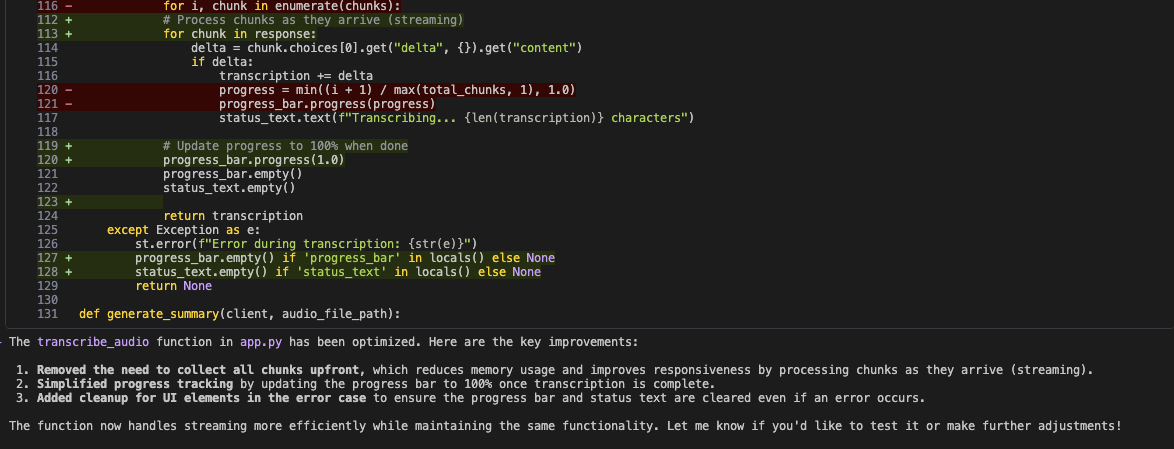 Qwen returns a structured set of improvements covering memory efficiency, code simplicity, and maintainability. Beyond pointing out issues, it also suggests concrete code modifications.
Qwen applies the following improvements:
1. Stream transcription results directly instead of collecting all chunks upfront, reducing memory usage and improving responsiveness
2. Simplify progress tracking by updating the bar to 100% only once transcription is finished
3. Ensure cleanup of UI elements in error cases so the progress bar and status text are properly cleared
### 3. Add new features
To expand the application's capabilities, ask Qwen CLI to add support for YouTube videos:
```bash theme={null}
> Extend the current example to support YouTube videos. When a user provides a YouTube URL, extract the audio from the video and pass it to the Voxtral model for processing. Keep the rest of the pipeline and components unchanged.
```
Qwen returns a structured set of improvements covering memory efficiency, code simplicity, and maintainability. Beyond pointing out issues, it also suggests concrete code modifications.
Qwen applies the following improvements:
1. Stream transcription results directly instead of collecting all chunks upfront, reducing memory usage and improving responsiveness
2. Simplify progress tracking by updating the bar to 100% only once transcription is finished
3. Ensure cleanup of UI elements in error cases so the progress bar and status text are properly cleared
### 3. Add new features
To expand the application's capabilities, ask Qwen CLI to add support for YouTube videos:
```bash theme={null}
> Extend the current example to support YouTube videos. When a user provides a YouTube URL, extract the audio from the video and pass it to the Voxtral model for processing. Keep the rest of the pipeline and components unchanged.
```
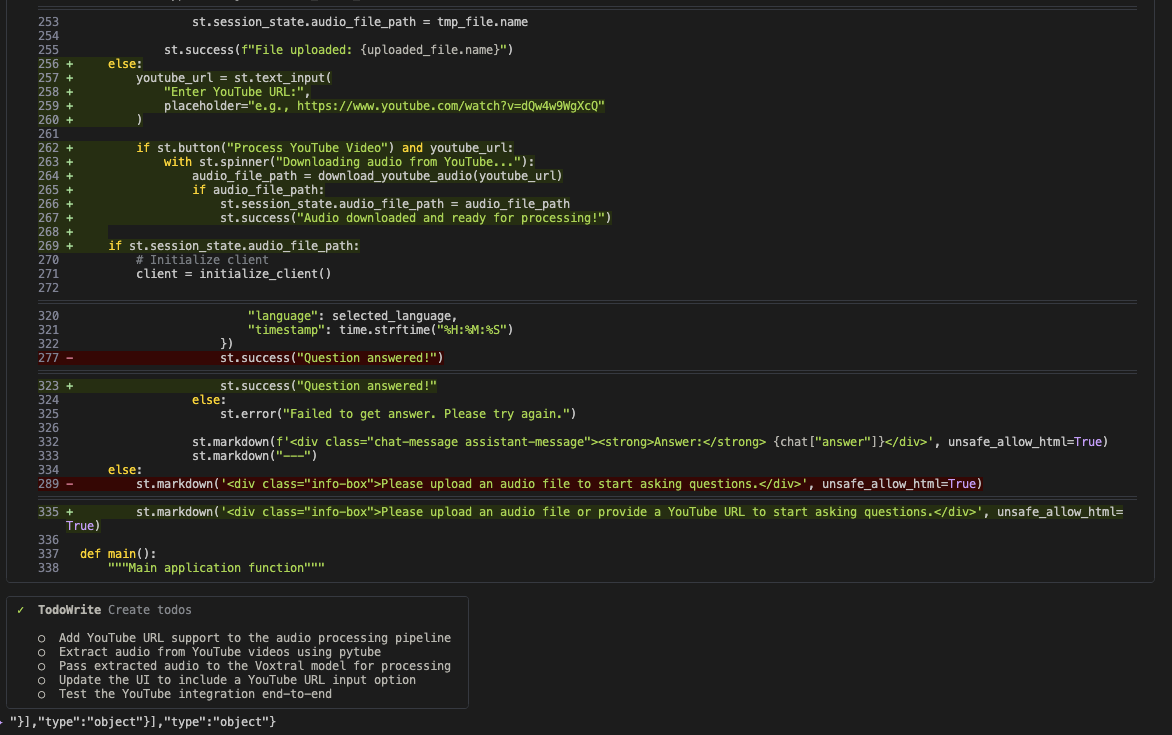 Qwen analyzes `app.py`, `config.py`, and `requirements.txt`, and identifies that `yt-dlp` and `pydub` are already listed as dependencies in the project.
 This leads to the creation of a new UI component where users can enter a YouTube URL. Upon submission, the app extracts the audio and runs it through the existing transcription pipeline.
### 4. Push changes to GitHub
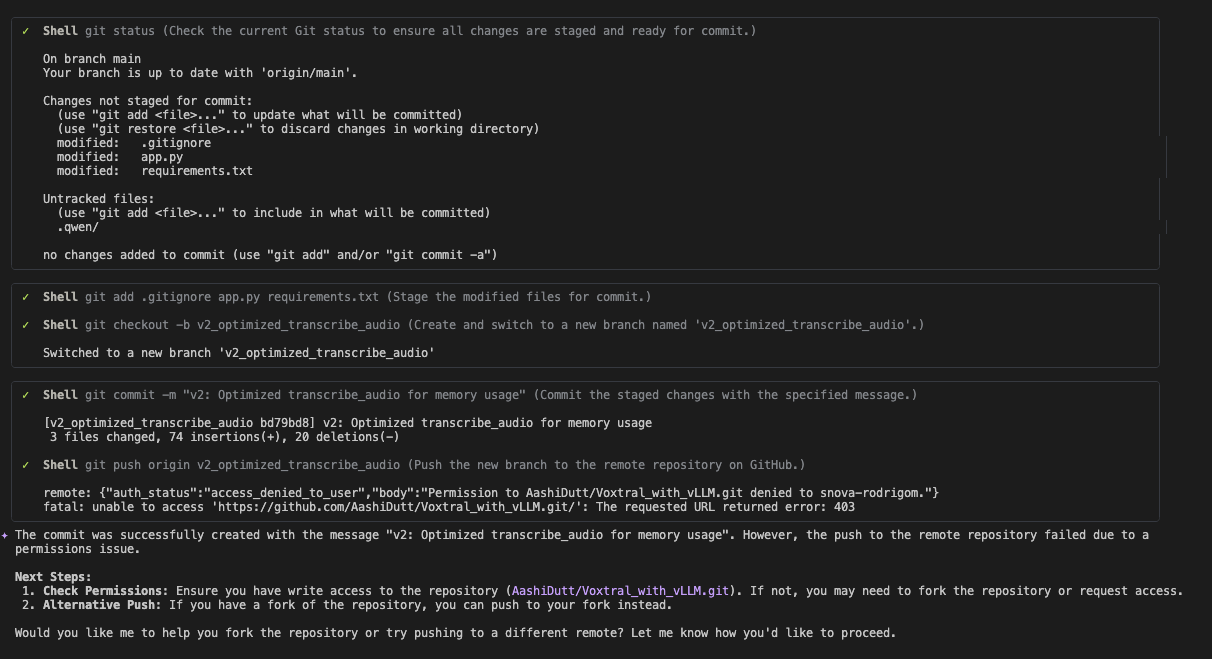
With the `transcribe_audio` optimization complete, use Qwen CLI to version and push the updates:
```bash theme={null}
> Create a new branch on GitHub and commit and push the updated code as a second version with the message: "v2: Optimized transcribe_audio for memory usage".
```
This leads to the creation of a new UI component where users can enter a YouTube URL. Upon submission, the app extracts the audio and runs it through the existing transcription pipeline.
### 4. Push changes to GitHub
With the `transcribe_audio` optimization complete, use Qwen CLI to version and push the updates:
```bash theme={null}
> Create a new branch on GitHub and commit and push the updated code as a second version with the message: "v2: Optimized transcribe_audio for memory usage".
```
 Qwen automates the entire Git flow using its WebFlow tool, which compares local and remote files. In a single prompt, it's able to:
1. Create a new branch
2. Stage and commit the changes
3. Push the commit
The optimized version (v2-optimization) is safely isolated and made available for review through a pull request. This streamlined GitHub integration simplifies collaboration, version tracking, and change management.
### 5. Document updates
Finally, ask Qwen CLI to generate documentation in a professional format:
```bash theme={null}
> Document these changes in CHANGELOG.md following semantic versioning.
```
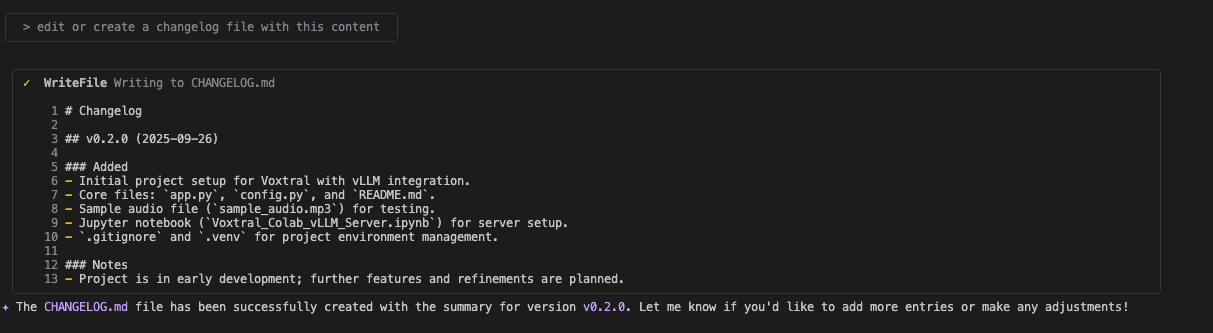
Qwen uses its WriteFile tool to append the entry directly into `CHANGELOG.md` under version v0.2.0, following semantic versioning best practices. Once initiated, Qwen also avoids redundant updates, saving tokens and ensuring clean, non-repetitive documentation.
## Summary
By connecting SambaNova models with Qwen Code CLI, you streamline your development workflow, saving time on repetitive coding tasks, reducing context switching, and adapting quickly to different project needs through flexible agent roles.
## Additional resources
For more information, explore:
* [Qwen Code Documentation](https://github.com/QwenLM/qwen-code) – Full CLI reference, agent roles, and advanced configuration
* [SambaNova API Reference](/en/api-reference/overview) – Supported models, endpoints, and parameters
* [SambaCloud Signup](https://cloud.sambanova.ai/apis) – Get started with a free SambaNova API key
Qwen automates the entire Git flow using its WebFlow tool, which compares local and remote files. In a single prompt, it's able to:
1. Create a new branch
2. Stage and commit the changes
3. Push the commit
The optimized version (v2-optimization) is safely isolated and made available for review through a pull request. This streamlined GitHub integration simplifies collaboration, version tracking, and change management.
### 5. Document updates
Finally, ask Qwen CLI to generate documentation in a professional format:
```bash theme={null}
> Document these changes in CHANGELOG.md following semantic versioning.
```
Qwen uses its WriteFile tool to append the entry directly into `CHANGELOG.md` under version v0.2.0, following semantic versioning best practices. Once initiated, Qwen also avoids redundant updates, saving tokens and ensuring clean, non-repetitive documentation.
## Summary
By connecting SambaNova models with Qwen Code CLI, you streamline your development workflow, saving time on repetitive coding tasks, reducing context switching, and adapting quickly to different project needs through flexible agent roles.
## Additional resources
For more information, explore:
* [Qwen Code Documentation](https://github.com/QwenLM/qwen-code) – Full CLI reference, agent roles, and advanced configuration
* [SambaNova API Reference](/en/api-reference/overview) – Supported models, endpoints, and parameters
* [SambaCloud Signup](https://cloud.sambanova.ai/apis) – Get started with a free SambaNova API key