

Add an administrator
Users can be granted elevated access by adding their email to the SambaStack configuration. To add a user as an administrator:- SambaStack on-prem / Airgapped
- SambaStack hosted
Step 1: Add admin email
Add their email address under thedb-admin section in the sambastack.yaml file. For example:Only add email addresses of authorized admins to maintain security. Must be at the same YAML level as
bundles (root-level key in sambastack.yaml).See the SambaStack.yaml Reference for a full example.
Step 2: Apply Configuration
After updating the .yaml file, apply the following configuration:Version numbers change with new chart releases. Use the version number provided by your SambaNova representative.
Step 3: ensure admin panel access
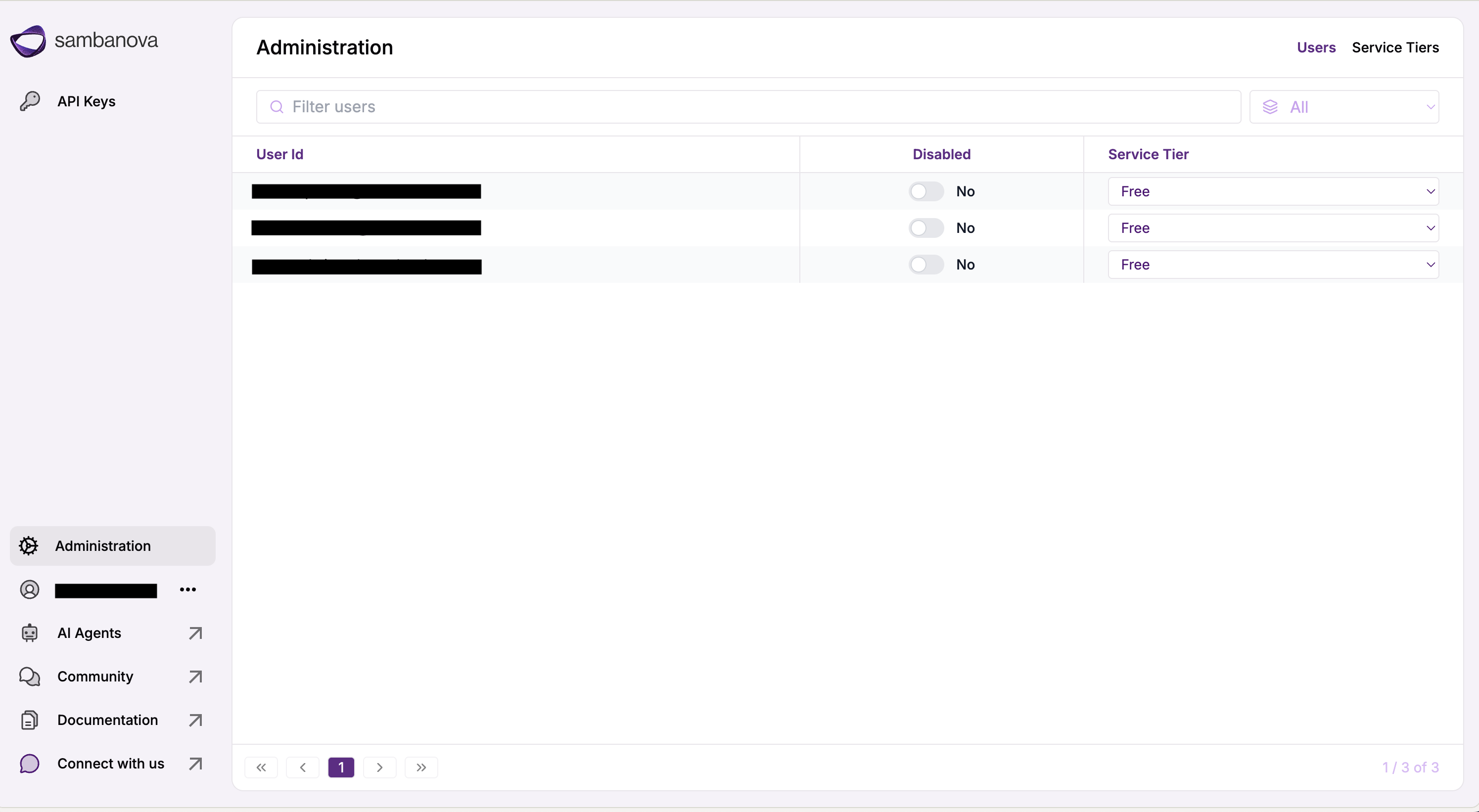
Open a browser (Chrome recommended) and navigate to the admin url:Administration tab on the left panel.
Service tiers
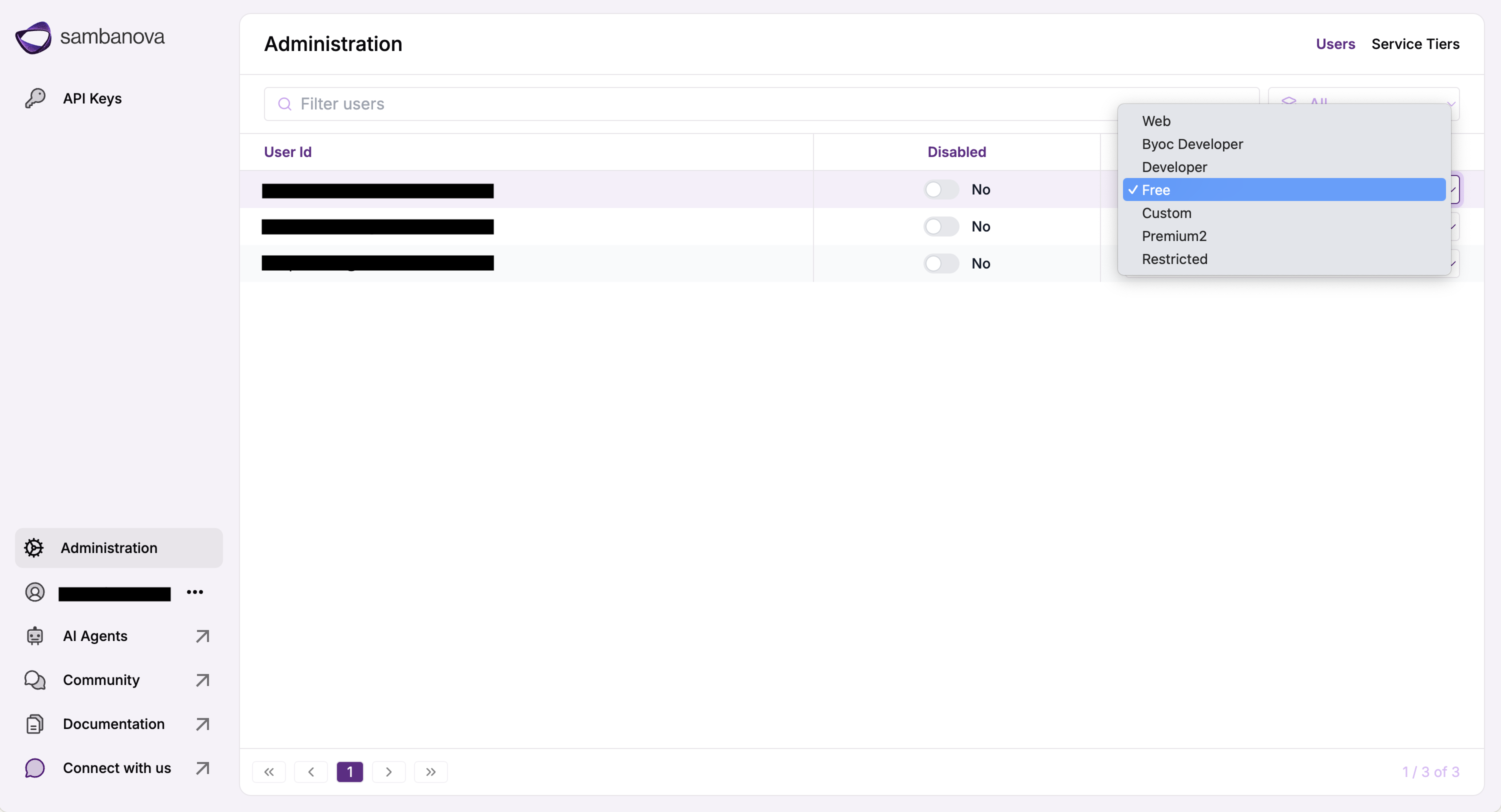
Service tiers define what models users can access, their usage limits, and permissions.Key concepts
Service tiers offer powerful controls to tailor user access, usage limits, and permissions:- Control access: Decide which models each user or group can use.
- Set usage limits: Define how many requests or tokens a user can make in a set period.
inherits attribute allows a tier to extend another base tier’s configuration. When inheriting, only specified fields in the overrides section are modified, enabling precise and maintainable customization.
Configuration fields
The following table outlines the key fields used to define service tiers, along with descriptions and example values for each.| Field | Description | Example |
|---|---|---|
qos | Quality of Service level assigned to requests from this tier. Usually matches the service tier name. | enterprise-group-1, customer-demo |
models | List of models accessible to users within the tier. A model must be included in at least one tier for users to access it. | [Llama-3.3-Swallow-70B-Instruct-v0.4] |
queueDepth | Maximum number of queries to queue before returning a busy response. | 100 |
allowedRequests | Defines how many requests are allowed per period in seconds, may be combined with allowedTokens. | { allowedRequests: 10, periodSeconds: 60 } |
allowedTokens | Defines how many tokens are allowed per period in seconds, may be combined with allowedRequests. | { allowedTokens: 300000, periodSeconds: 60 } |
periodSeconds | Defines the interval for setting rate limits, used with allowedRequests and/or allowedTokens. | { allowedRequests: 10, periodSeconds: 60 }, { allowedTokens: 300000, periodSeconds: 60 }, { allowedRequests: 20, allowedTokens: 200000, periodSeconds: 86400 } |
inherits | Allows a tier to inherit settings from a base tier and override specific fields. | inherits: previously defined tier name, overrides: mentions which properties to override |
System-managed tiers
Some tiers are pre-configured and system-managed. Do not remove or disable these tiers — misconfiguring them can interrupt critical workflows.| Tier | Purpose | HTTP Response |
|---|---|---|
free / web | Default baseline access tiers | Standard |
deprecated | Models permanently removed | 410 (Gone) |
maintenance | Models temporarily unavailable | 503 |
restricted | Models with limited access | 403 |
sambastack.yaml, it reverts to SambaNova defaults.
Sample configuration
- SambaStack on-prem / Airgapped
- SambaStack hosted
Add a Apply changes:
serviceTiers section at the same YAML level as bundles (root-level key).See the SambaStack.yaml Reference for a full example.
Version numbers change with new chart releases. Use the version number provided by your SambaNova representative.
Using inheritance
You can define base tiers and create derived tiers using inheritance for reuse and consistency. Base tier example:- SambaStack on-prem / Airgapped
- SambaStack hosted
After updating the configuration, apply the changes:
Version numbers change with new chart releases. Use the version number provided by your SambaNova representative.
Best practices
When creating and managing service tiers, consider the following best practices to ensure stability, security, and flexibility: 1. Preserve system-managed and default tiers Some tiers are pre-configured and system-managed and should not be removed or disabled. These tiers provide baseline access and enforce model lifecycle and access controls. Removing or misconfiguring them can interrupt critical workflows. This includes:- free / web – Default baseline access tiers.
- deprecated – Models permanently removed (HTTP 410).
- maintenance – Models temporarily unavailable (HTTP 503).
- restricted – Models with limited access (HTTP 403).
free or web) to tailor access while preserving the underlying structure.
Complete example
- SambaStack on-prem / Airgapped
- SambaStack hosted
Example of System-managed, Required, and Custom Tiers in
sambastack.yaml. Must be at the same YAML level as bundles (root-level key in sambastack.yaml).Rate limiting
Rate limiting controls the number of API or UI requests accepted per minute to protect the cluster from overload and abuse. In SambaStack on-prem, rate limiting can be applied at two layers:| Layer | Description | Configuration Source | Status |
|---|---|---|---|
| Ingress Layer (NGINX) | Enforces limits at the Kubernetes ingress controller using NGINX annotations | NGINX ingress controller configuration | Optional (Recommended) |
| Application Layer (Service Tiers) | Enforces limits at the gateway level using Helm chart parameters | sambastack.yaml (serviceTiers section) | Required. See Service tier management |
Application layer rate limits are mandatory and configured via service tiers. See Service tier management for details.
Overview
- Ingress-layer rate limits are optional but recommended for customers using the NGINX ingress controller.
- The Helm chart does not ship with default rate-limit annotations; customers can enable them manually.
- Application layer rate limits remain mandatory and are configured in the
serviceTiersblock ofsambastack.yaml. - If you bring your own Kubernetes cluster and ingress controller, you can use equivalent annotations or omit ingress-level limits entirely.
Ingress-layer rate limiting (optional, recommended)
If your cluster uses RKE2’s built-in NGINX ingress controller, you can define global rate-limit zones at the cluster level and reference them in the API and UI ingress annotations. Step 1: Define Global Rate-Limit Zones Apply the followingHelmChartConfig to configure global rate-limit zones for the ingress controller.
Save the below as rke2-ingress-nginx.yaml:
_req_min_ipzones are used for the UI (IP-based limits)_req_min_headerzones are used for the API/Gateway (Authorization header-based limits)
Rate limit values should scale with cluster size. For larger deployments (e.g., 10-node clusters), consider higher limits such as 5000 or 8000 requests per minute.
sambastack.yaml under the cloud-ui.ingress and gateway.ingress sections:
See the SambaStack.yaml Reference for a full example.
- These snippets tell NGINX which rate-limit zone to apply
- You can adjust the
burstandratevalues as needed - Ingress-based rate limiting is per ingress-controller pod, not cluster-wide
- Total effective rate = configured rate × number of ingress pods
SambaNova provides the full registry URL and version number during handover. Contact your SambaNova representative for access credentials.
Key recommendations
- Use ingress-layer limits for infrastructure-level protection (e.g., DDoS or abusive burst prevention)
- Use service-tier limits for application-level throttling and user-specific rate control
- Ingress configuration is optional, but SambaNova recommends enabling it when using RKE2’s built-in NGINX ingress controller
- For customers using other ingress controllers (e.g., Istio, AWS ALB, or NGINX Plus), equivalent configurations can be applied at their discretion
- Default Helm chart values will not include any rate-limit annotations; these can be overridden by customers at deployment time
Quality of service (QoS)
Quality of Service (QoS) defines priority levels that determine how requests are processed across deployments when competing for resources. It ensures that higher-priority traffic receives precedence over lower-priority traffic, optimizing resource allocation during periods of contention.How QoS works
- Each service tier is assigned a
qoslabel. - Deployments define the priority order using
qosListin their specifications. - Requests are processed in priority order: the first QoS level in the list is served first.
See the SambaStack.yaml Reference for a full example.
web tier requests first, then free tier requests when no web traffic is queued.
Purpose of QoS
QoS prioritizes requests so that higher-tier traffic is served before lower-tier traffic, ensuring predictable and fair resource sharing.- Example: A deployment listing
qosList: ["free", "web"]serves free tier requests first, falling back to web tier requests only when no free traffic is queued.
QoS vs. service tiers
| Concept | Purpose | Defined In |
|---|---|---|
| Service Tier | Defines who can access what and how much (models, rate limits) | sambastack.yaml or Admin UI |
| QoS | Defines when requests are processed (priority order) | qosList in bundleDeploymentSpecs |
- Service tiers define who can access what and how much.
- QoS defines when requests are processed based on priority.
Important notes
- The
freetier is automatically assigned to all new users. - Deployments can support multiple QoS levels to handle different traffic types concurrently.
Request handling workflow
The following outlines the step-by-step processing of a user request, illustrating how service tiers and QoS priorities interact to manage and route traffic efficiently.- A user sends an API request using their credentials.
- SambaStack identifies the user’s assigned service tier (usage plan).
- The request is checked against that tier’s allowed models, batch size, rate limits, and associated QoS.
- The deployment selects requests to process according to its
qosListpriority. - If the request exceeds the user’s rate limit, it is rejected with a
429 Too Many Requestsresponse. - If the QoS queue for the request’s priority level is full, the system returns a busy response.
- Otherwise, the request is placed in the QoS queue awaiting processing.