

This guide was tested on the Voiceflow Free plan in November 2026. Menu names and limits can change, so check the Voiceflow documentation if a screen looks different.
Prerequisites
- A SambaCloud account and API key
- A Voiceflow account and an agent. A new agent starts with an Untitled workflow, which is all you need.
Find your way around Voiceflow
The build steps below happen in two different places, so it helps to know both before you start.- The workflow canvas is the dotted grid you build on. Open it from the left sidebar: under Build, click Workflows, then click Untitled workflow. The canvas holds a green Start pill and the steps you drag onto it, joined by arrows.
- The step palette floats on the left edge of the canvas. A dropdown at the top of it switches between Agentic steps (Playbook, Crew) and Scripted steps (Message, Cards, Carousel, Buttons, Listen). Below the dropdown, Tools (API, Function, Integration, MCP) and Logic stay visible in both modes.
- Secrets is a separate full-screen page, not part of the canvas. Reach it from Settings, or press
Cmd + Kand typesecrets.
Store your API key as a secret
1
Create the secret
Open Secrets from Settings, or press 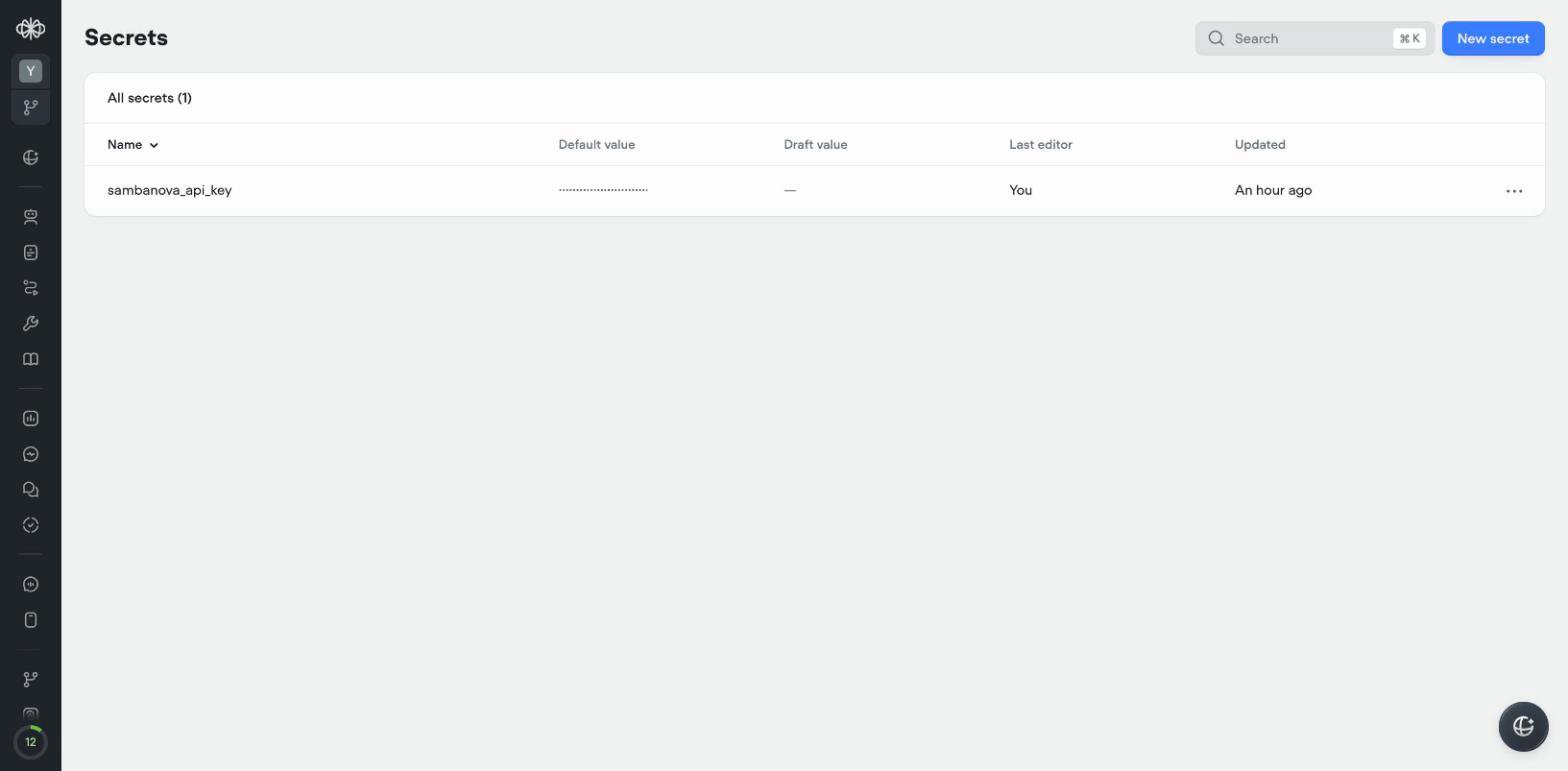
Cmd + K and type secrets. Click New secret. Set Name to sambanova_api_key, paste your SambaCloud API key into Default value, leave Visibility as Masked, and click Create secret. Paste only the key, without a Bearer prefix.Create the Function tool
The function sends the conversation to SambaCloud and returns the reply. Voiceflow runs it in a sandbox, so nothing persists between runs. The function receives the conversation history as an input and returns the updated history as an output.1
Add a Function step
Open the workflow on the canvas. In the step palette, under Tools, drag Function onto the canvas. In the panel that opens on the right, click Create function tool.
2
Name the tool and add variables
Set Name to
ask_sambanova_fn. Under Input variables, add question, api_key, and chat_history. Under Output variables, add answer and chat_history.3
Paste the code
The editor already contains the first line, The Voiceflow 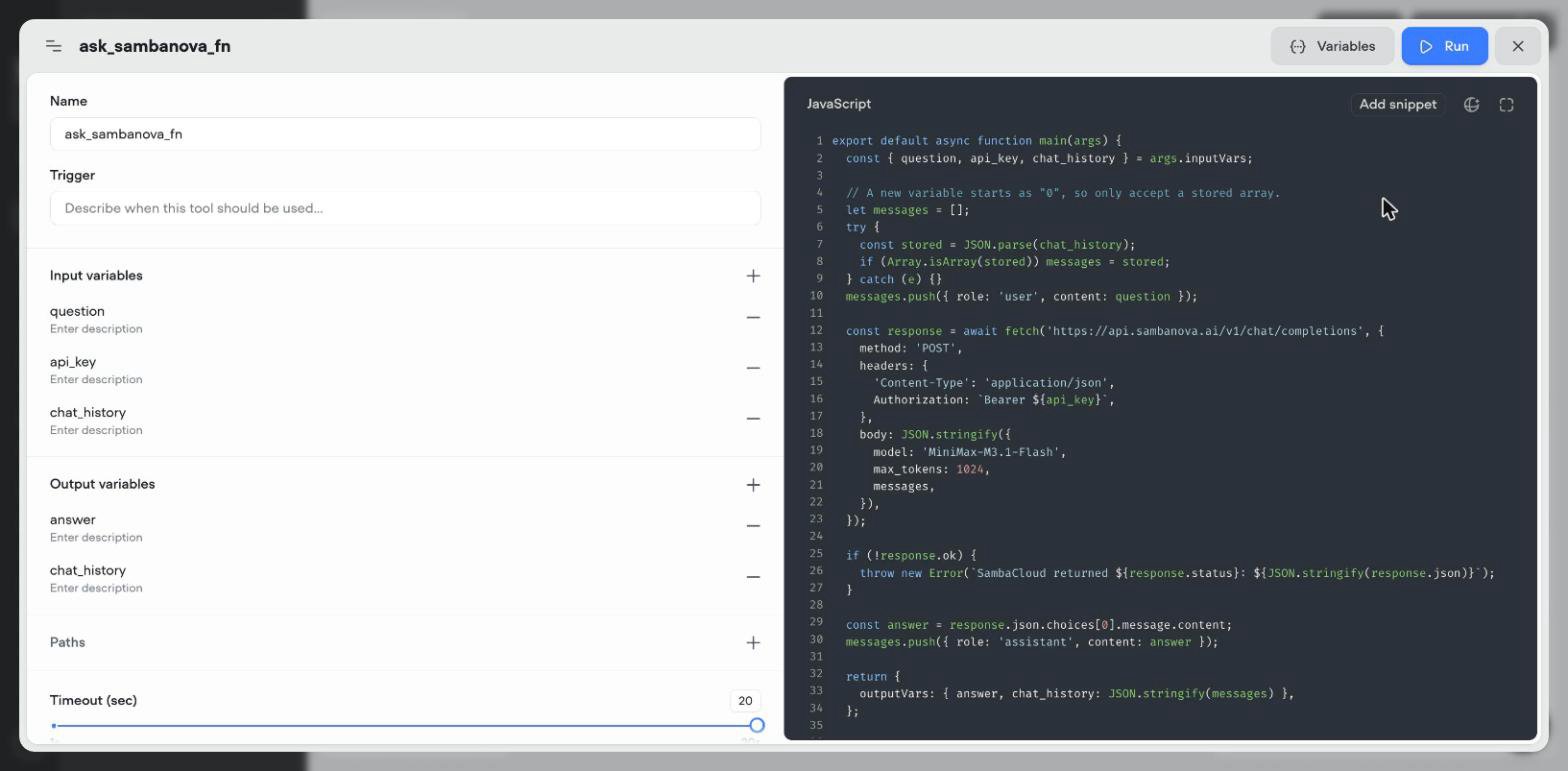
export default async function main(args) {, and the last line, }. Select all, delete, and paste only the lines between them:fetch returns the parsed body as the json property, so there is no .json() call. JSON.stringify escapes quotes in the user’s message, which a fixed request body cannot do. The if (!answer) check covers a reply with no text: SambaCloud answers HTTP 200 with an empty content when reasoning uses up max_tokens, so response.ok does not catch it.Build the workflow
1
Add the other steps
Listen and Message are Scripted steps, so switch the dropdown at the top of the step palette from Agentic to Scripted to see them. Drag one of each onto the canvas. Connect Start to Listen, Listen to the Function step, the Function step to Message, and Message back to Listen so the chat continues after each reply. Listen saves what the user types to the
last_utterance variable.2
Map the Function inputs
Click the Function step. The right panel lists the three inputs, each marked Not added. Click a row, then type
{ in the field to open the picker. If the picker closes before you choose, type { again to reopen it.question: on the Variables tab, selectlast_utteranceapi_key: switch to the Secrets tab and selectsambanova_api_keychat_history: this variable does not exist yet, so the list does not contain it. Keep typingchat_historyafter the{until the list is empty, then click Create variable at the bottom of the picker and turn Persist across sessions off, so one chat does not carry into the next.
3
Save the Function outputs
Both outputs start as Not saved. Click each row and choose where to save it:
answer goes to a new variable named sambanova_answer, and chat_history goes to the chat_history variable you just created. Both rows must read Saved before the workflow will work, because an unsaved output never reaches the Message step.4
Show the answer
The Message step still reads Add message, which sends an empty reply. Click it, type 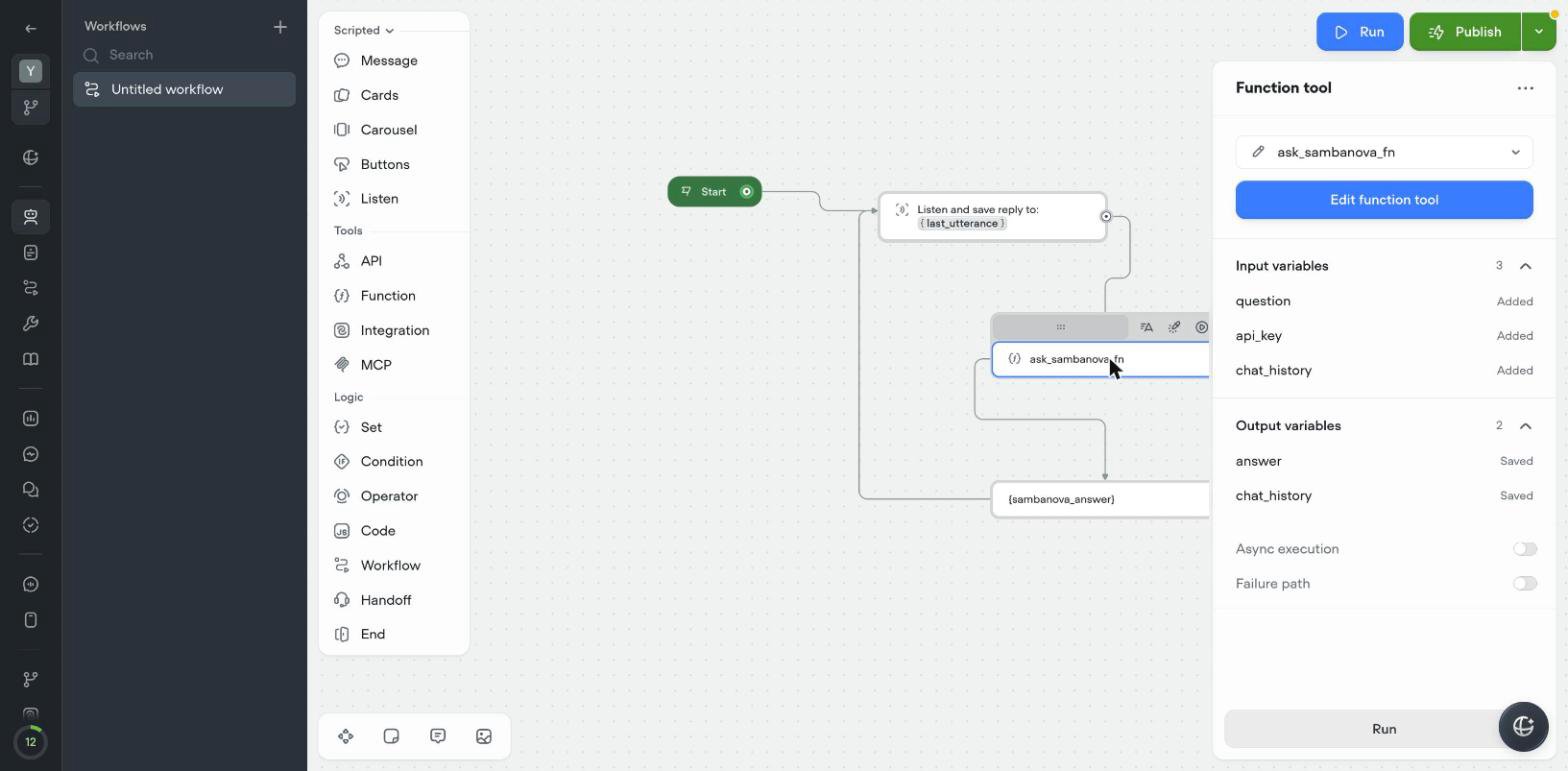
{, and select sambanova_answer.Test the workflow
Click Run in the top right of the canvas and wait for Compiling agent to finish. Send a few messages:What can you do?My name is Gil.What is my name?Say "hello" in French.
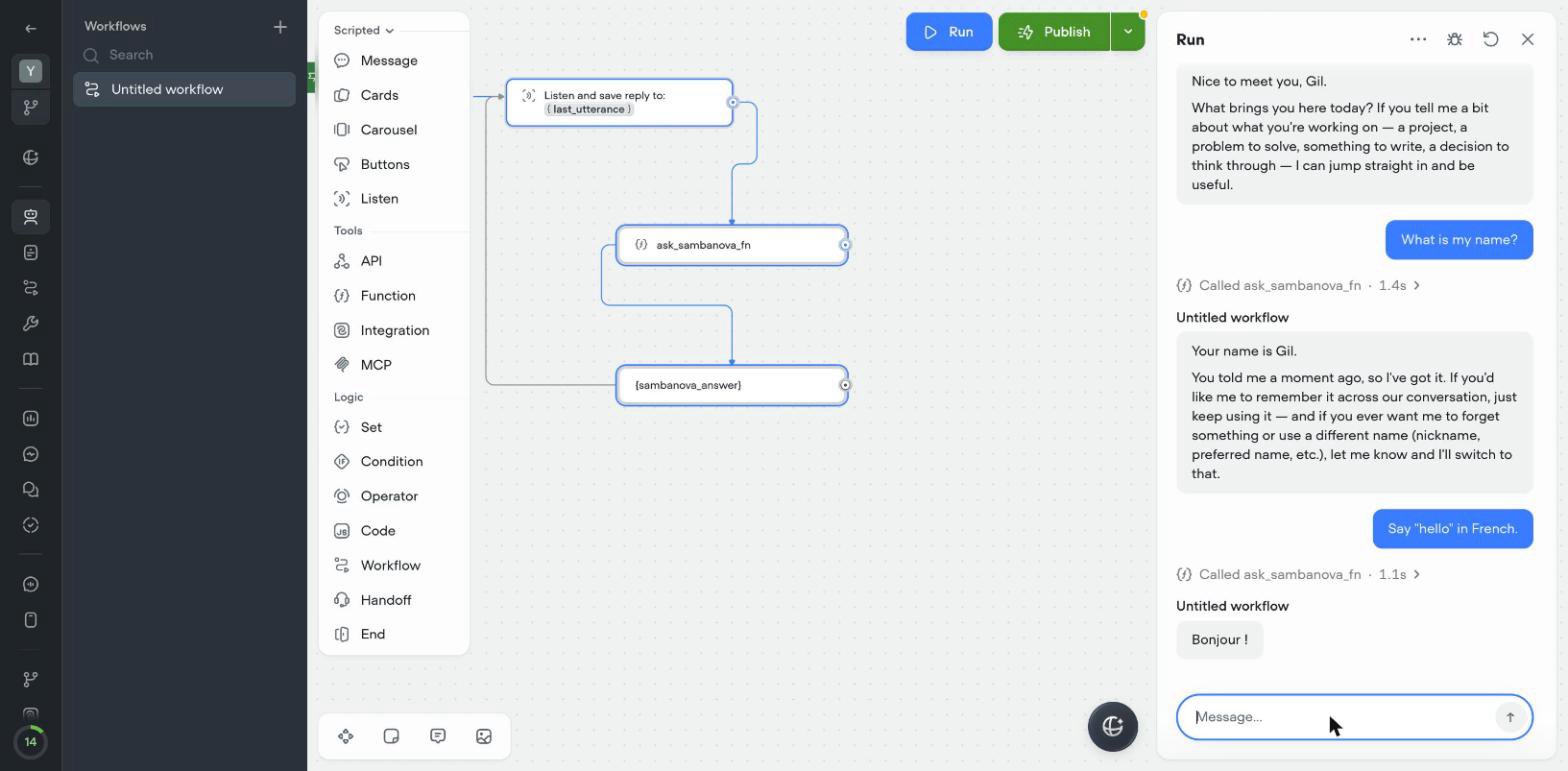
MiniMax-M3.1-Flash on SambaCloud. The third message shows that the history works, and the fourth shows that quotes in a message do not break the request.
MiniMax-M3.1-Flash is a reasoning model. In this test the Function step took 4.6 seconds on the first message and 1 to 2 seconds on later ones. A Function step stops at its timeout, which has a maximum of 20 seconds.What this integration does not cover
- The agent and Playbooks keep using Voiceflow’s model. The Agent model picker lists only Voiceflow-hosted models. In a test where an agent held a SambaCloud API tool, it called the tool for one message and answered from its own model for the next. For replies that always come from SambaCloud, use a workflow like the one in this guide.
- Playbooks and the API key. Voiceflow documents that an agent generates a function’s input values when it runs in a Playbook, so
api_keycannot come from a secret there. This guide did not test the Function tool inside a Playbook.
Troubleshooting
The Function step fails and the chat repeats the previous answer
The Function step fails and the chat repeats the previous answer
When the function throws, the Message step prints the last value of
sambanova_answer. In the Run panel, click the line that says the tool failed to read the error, then use the items below.The reply says the model ran out of room, or ends in the middle of a sentence
The reply says the model ran out of room, or ends in the middle of a sentence
MiniMax-M3.1-Flash reasons before it answers, and the reasoning counts toward max_tokens: 1024. On a long or hard question the reasoning can use the whole budget. The function then returns the “ran out of room” message when no text is left, and a reply cut off mid-sentence when only some text is left. Ask a shorter or simpler question, or add reasoning_effort: 'low', on the line after max_tokens in the request body to shorten the reasoning. This lowers the chance but does not remove it. Raising max_tokens does not help for long, hard questions, because a larger budget can push the step past its 20 second limit.TypeError: messages.push is not a function
TypeError: messages.push is not a function
A new variable starts with the value
"0", and JSON.parse("0") returns the number 0. Keep the Array.isArray check from the code above so the function ignores a stored value that is not an array.Incorrect API key provided
Incorrect API key provided
SambaCloud returned a 401. Check that the
sambanova_api_key secret holds your SambaCloud key without a Bearer prefix, and that you selected it from the Secrets tab in the Function step panel. A reference typed by hand, or one placed in an API tool header, is sent as literal text, so the error shows a value like {samba*****key}.The pasted code has a duplicated first line or an extra brace
The pasted code has a duplicated first line or an extra brace
The editor keeps its own
export default async function main(args) { line and closing }. Select all, delete, and paste only the lines between them.We could not parse the JSON body of your request
We could not parse the JSON body of your request
This appears when you call SambaCloud from an API tool with a raw JSON body, because a quote in the user’s message breaks the JSON. Use the Function step in this guide, which builds the body with
JSON.stringify.Typing on the canvas opens panels or changes tools
Typing on the canvas opens panels or changes tools
Voiceflow’s canvas has single-key shortcuts. If you type while no field is focused, for example after a click that did not open an input, letters can open the Run panel or select a toolbar tool. Click the field first, and press
Escape to leave a tool.