
Safety warnings
Review and observe the following safety requirements before performing any power operations.High voltage is present within the rack. To prevent injury and warranty violations, do not service components except where explicitly noted.
Power sequence summary
The following summaries show the required order for power-on and power-off operations. Detailed procedures are provided in subsequent sections.Power-on order
Power on components in the following sequence:- Core Services Rack
- Turn on PDU circuit breakers
- Boot SMS and Control Plane servers
- SambaRack SN40L-16
- Turn on PDU circuit breakers
- Boot SN40L-2 RDU modules
- Boot SN40L-H host module
Power-off order
Power off components in the following sequence:- SambaRack SN40L-16
- Shut down SN40L-H host module
- Shut down SN40L-2 RDU modules
- Network devices (in order)
- Juniper QFX5130 data switch
- Lantronix SLC8000 serial console server
- Juniper EX series access switch (last)
Power-on procedures
Complete the following steps after initial installation or a full power-down.Step 1: Enable PDU circuit breakers
Turn on all six circuit breakers on each PDU. When the breakers close, power is applied to all rack components automatically.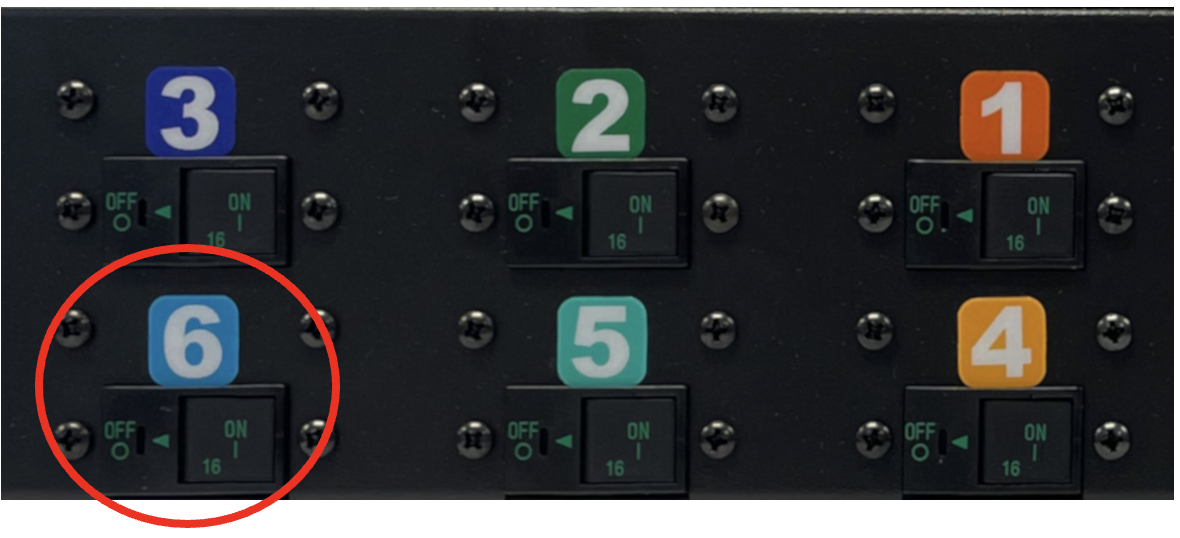
| Component | State |
|---|---|
| SN40L-H host module | Standby (BMC powered, awaiting manual power-on) |
| SN40L-2 RDU modules | Standby (BMC powered, awaiting manual power-on) |
| Network equipment | Fully booted |
The Juniper QFX5130 port 16 displays an amber light. This is expected and does not indicate a fault.
Step 2: power on via SambaRack manager (recommended)
If SambaRack Manager is installed, use it to complete the power-on sequence. See the Power on section in Node management. If SambaRack Manager is unavailable, continue with Steps 3 and 4.Step 3: boot SN40L-2 RDU modules
This step powers on the SN40L-2 RDU modules, which must be fully operational before starting the host module.IP addresses are documented in your customer-specific IP assignment worksheet. Contact your administrator if needed.
- Access to the rack management network
- Connect to the first SN40L-2 RDU module:
- Power on all RDU modules:
- Verify power state before proceeding:
- Access to the rack management network
- Authentication token generated
SambaNova recommends token-based authentication. See Generate a secure API login token for details.
- Send the power-on command to each SN40L-2 RDU module (any order):
- Verify power state before proceeding:
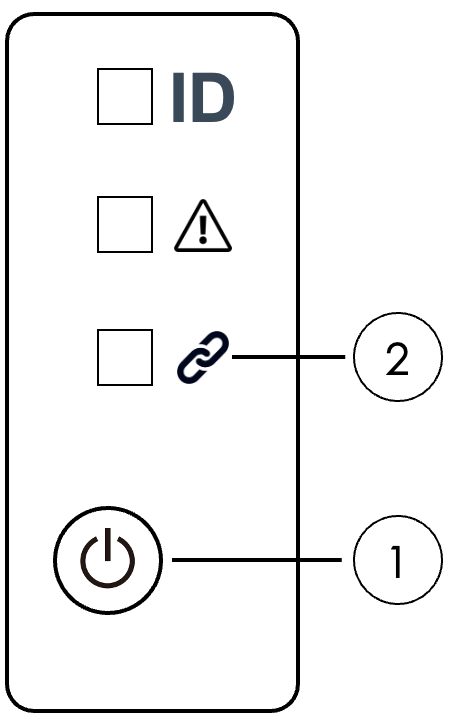
- Locate the power button on the front left panel (item 1 in the figure below).
- Press and hold for 5 seconds.
- Wait for the system LED (item 2) to change from blinking to solid green (up to one minute).
- Repeat for each SN40L-2 module in the node.
Step 4: Boot SN40L-H host module
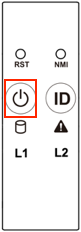
This step powers on the host module after all RDU modules are operational. Choose one of the following methods: Option A: Physical power button Use the front panel power button to manually power on the host module. Procedure:- Press the power button on the front left panel of the SN40L-H.
ipmitoolinstalled on your workstation- Access to BMC via access network
- Run the following command:
- Access to BMC via access network
- Chrome or Firefox (latest version)
- Navigate to
https://<SN40L-H_BMC_IP>in your browser. - Log in and click Sign me in.
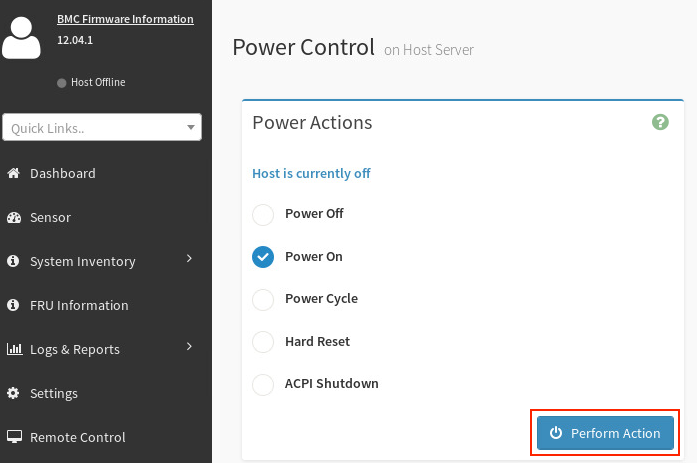
- Select Power Control from the dashboard.
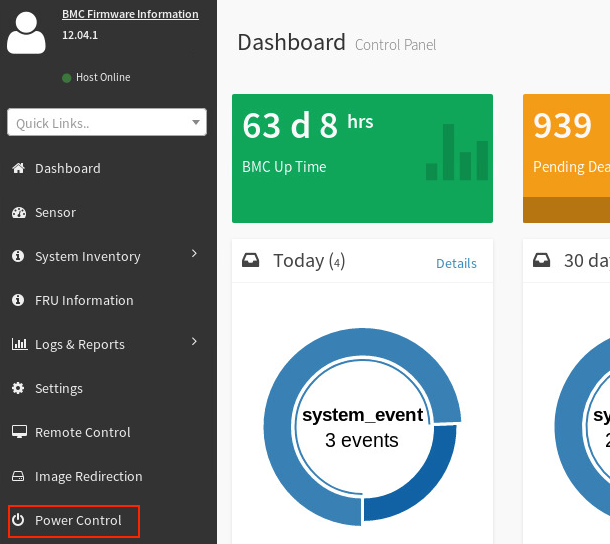
- Select Power On, then click Perform Action.
- Repeat for all nodes in the rack (any order).
Power-off procedures
Use SambaRack Manager for routine power-off operations. See Node operations. If SambaRack Manager is unavailable, complete the following steps in the order listed.Step 1: Shut down SN40L-H host module
This step gracefully shuts down the host module before powering off the RDU modules. Choose one of the following methods: Option A: Operating system Initiate a graceful shutdown from the operating system. Prerequisites:- SSH access to the node
- Connect to the node and run the shutdown command:
ipmitoolinstalled on your workstation- Access to BMC via access network
- Run the following command:
- Access to BMC via access network
- Chrome or Firefox (latest version)
- Navigate to
https://<SN40L-H_BMC_IP>in your browser. - Log in and click Sign me in.
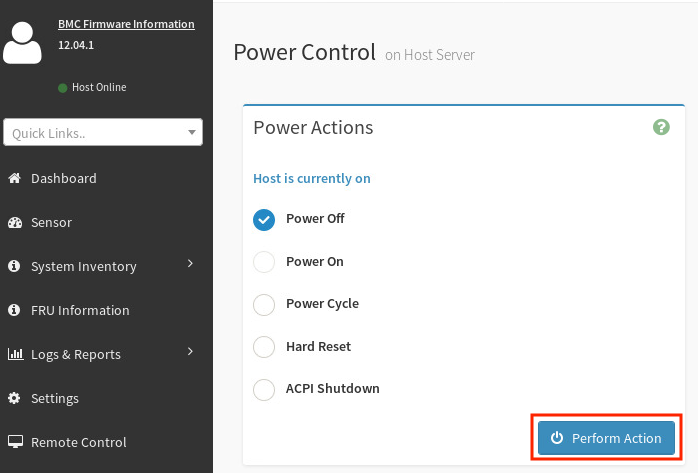
- Select Power Control from the dashboard.
- Select Power Off, then click Perform Action.
Step 2: Shut down SN40L-2 RDU modules
This step powers off the RDU modules after the host module is fully shut down. Choose one of the following methods: Option A: SSH Use SSH to connect to the BMC and run power-off commands. Prerequisites:- Access to the rack management network
- Connect to the first SN40L-2 in each node:
- Power off all RDU modules:
- Access to the rack management network
- Authentication token generated
- Send the power-off command to each SN40L-2 RDU module:
Step 3: Shut down network devices
This step powers off the network infrastructure. The access switch must be shut down last because it controls management network connectivity. Shut down network devices in the following order:| Order | Device | Notes |
|---|---|---|
| 1 | Juniper QFX5130 data switch | — |
| 2 | Lantronix SLC8000 serial console server | — |
| 3 | Juniper EX series access switch | Shut down last. Controls management network access. |
Once the access switch is powered off, PDU outlets cannot be cycled remotely. To restore power, physically toggle the circuit breakers on the PDU.